
One topic.
The right moment.
Organise lessons in folders and divide longer videos into chapters. Your audience can jump straight to the explanation they need.
Videos for your course

Video hosting for your daily work
From your first upload
to your audience.
Organise your videos by project and find them again with search. Design players and video pages, share your content and review how it is used – in one workspace.
The player demo is available to try without signing in.
30 days free. No payment details. Already have an account? Sign in.
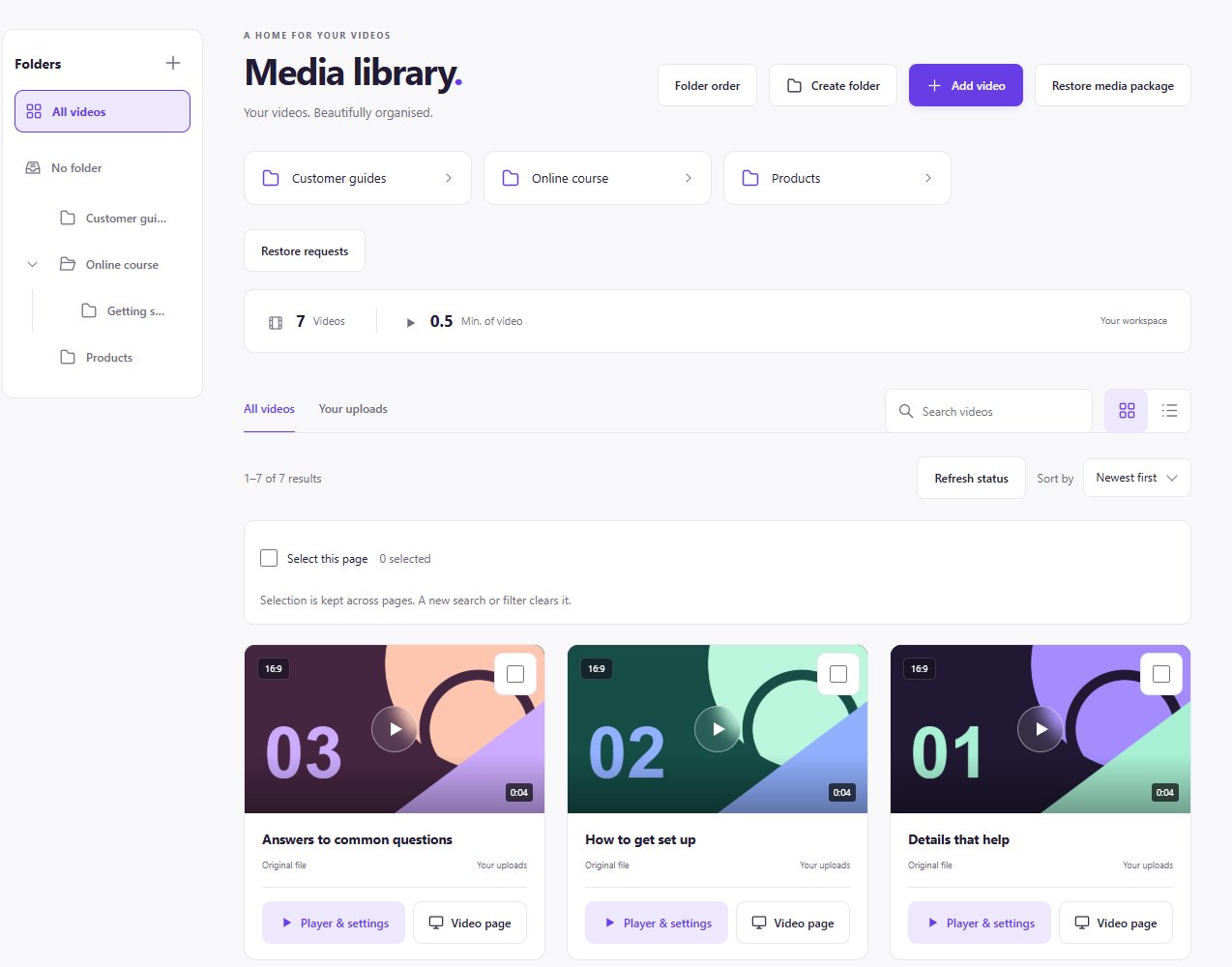
One workflow for your videos
Vioneto connects each step: organise your content, prepare it for your audience and then see which videos are being played.
Design illustration
Transfer and processing stay distinct. Follow progress and find your finished video in the media library.
How to read upload statusFolders and subfolders keep courses, products and client projects together. Find a video with search and open its settings directly. Shared folder defaults help with settings you use repeatedly.
Explore the media library and uploadsDesign illustration
Colour, poster image and player design give your video your look. Try the demo to find what feels right.
Try the real playerUnderstand usage
In statistics, choose a time period, videos or folders and compare recorded playback starts. See which content is being played. Billed traffic is shown separately in your account.
Statistics in your workspaceOne video. Four player designs. Choose what feels right. Try colours and embedding layouts with our intro, without signing in.
The player on its own: try the design, colour and playback.
A place for your story.
Your content. Your look. Right on your website.
Your knowledge. Your presence.
A dedicated page for your video, with your heading, your logo and space for what matters to you.
Website illustration · not a customer example.
Use this space for a summary, extra information or your next step.
How to customise and share your pageTry your own workflow during the 30-day trial: upload a video, customise your player and watch the result through a video link or on your website.
Your video starts out private. You decide when to make it available to viewers.
Your content. Your purpose.
Organise lessons in folders and divide longer videos into chapters. Your audience can jump straight to the explanation they need.
Videos for your courseMatch the colour and thumbnail to your brand and embed the video on your website. Explain your product right where visitors discover it.
Put your product in the spotlightExplain a process in a video and share it on a video page or through an embed. Chapters help your customers revisit individual steps.
Explain more clearly with videoYour content. A home.
From the first upload to a shared video: find your content, give it your look and see what comes next.
Uploading and processing are separate steps. The status view helps you follow progress and find your videos again.
Folders and subfolders give your projects a place. Keep track of your content and the settings that belong to it.
Embed your video on your website. If you do not have a website, customise a video page in Vioneto and share its link. Your audience finds your video where you want to show it.
Explore embedding & sharingBefore you share
Preview the look, organise your content and choose how viewers get access.
Choose the colour, aspect ratio and thumbnail to fit your style. Preview your player before sharing the video.
Explore the player previewChapters take viewers to a named moment in the video. Subtitles let them read along with the spoken words.
Explore chapters & subtitlesProtect a video with a password or limit access by website and time period.
Explore access optionsThe pricing page shows all four plans, their allowances and their shared core features.
Room for your next step
Choose by storage, monthly traffic and the number of logins you need. The pricing page shows all four plans, payment periods and add-ons with the total payable.
Need more storage or help from your team? Additional storage and team logins are charged monthly. Buy traffic credit as a one-off purchase when needed; it does not expire at month-end.
Your next step
Organisation, collaboration and getting started: find your next steps here.
See all featuresCustomise and save your player in Vioneto. Choose the protection rules and confirm viewer access. Then copy the embed code into a suitable HTML or embed block on your website. Check the video there as a viewer who is not signed in, too.
How to embed your videoNo. The video page feature lets you customise a page in Vioneto and share its link with your audience. Available features depend on your plan. If you later want to embed a video as well, that depends on your website system and editing permissions.
Explore your video pageYes. Invite team members to your workspace and assign suitable permissions. Each member has their own login and you work with the same video library. The pricing page shows how many logins are included and the cost of additional ones.
Explore accounts and collaborationThe trial includes 30 days, 1 GB of storage and 5 GB of traffic in total. No payment details are needed and it does not turn into a paid subscription. You decide whether to choose a paid plan. The trial page shows whether you can get started now.
See trial details and available placesYou do not have to figure it out alone.
An app should be easy to understand. Explore the path to your first video in our public help section. In your account, Getting Started, topic guides and available video tutorials remain within reach.
Explore help & first steps Read the quick answers without signing in.A place for your next video.
30 days, 1 GB of storage and 5 GB of traffic in total: try your workflow from upload to playback. No payment details and no automatic switch to a paid subscription.
The trial page shows whether a place is currently available. Already have an account? Open Vioneto.